Click to Learn C and C++ programming language Tutorial
Learning C and C++ programming language click on above tutorial link
Skype id: shafique-hanif
Monday, 26 December 2011
Copy Command
COPY:
This command is used to copies files to different places on your disks . This Command does not remove the source file after writing the new file. This command can be written as given below.
Copy is command is used to copy a file into another folder as given below.
copy is command "a" is a text file that is copied into directory shafiq.
when you press enter key a message will be displayed as shown in the second line " 1 file is copied" as picture.
when we copied our file to " shafiq directory" then we can check using dos our file is really copied to destination to check this we first go into destination directory using above typed command then press.
now we enter into destination directory as given in above picture. then we type a command to chek directory dir to check directory to view the file as given below.
This command is used to copies files to different places on your disks . This Command does not remove the source file after writing the new file. This command can be written as given below.
Copy is command is used to copy a file into another folder as given below.
copy is command "a" is a text file that is copied into directory shafiq.
when You type this command then press enter button hen following command will be displayed as given below.
now we enter into destination directory as given in above picture. then we type a command to chek directory dir to check directory to view the file as given below.
now in above picture Highlighted file which we copy into a directory.
Labels:
Copy
Wednesday, 21 December 2011
Edit Command
Edit Command:
This command is used to edit a file using dos. you can save this file write some text in ASCII file format. as given below.Edit Command is allows a user to view, create, or modify their computer files.
write edit command in the following way.
ok button to save the file with you required name your file will be saved successfully as given below.
name of my file is located under the help menu in menu bar in picture and this file is saved in the "d" drive
This command is used to edit a file using dos. you can save this file write some text in ASCII file format. as given below.Edit Command is allows a user to view, create, or modify their computer files.
write edit command in the following way.
now press enter key for edit purpose you view above screen as...
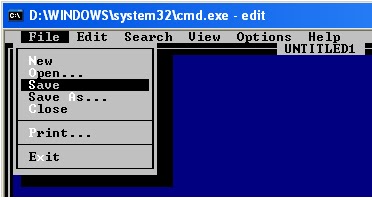
now you can write you text in this file you can also save your file your desired name.
as given below
after selecting save option from here a dialog box appear then you write the name of your file here then press
name of my file is located under the help menu in menu bar in picture and this file is saved in the "d" drive
to exit from the editor we do some specific task we go into > file menu. then we select > exit.
when we select Exit option we successfully from the Editor which provided us bu the dos.
Labels:
Edit
Friday, 16 December 2011
RD, RMDIR AND VOL
Dear Student Today I will discuss to you about rd , rmdir and vol commands of DOS respectively,
RD, RMDIR Command
RD(Remove Directory) and RMDIR both these commands are used to remove directory from current working directory .
1) first we will see the list of all directories for our understanding
2) Now we type command to create a directory in DOS as given in picture below
3) we check our directory using "dir " command in following way as given below
when we type this command and pres "enter /return" key from keyboard your required directory is removed
you can check it by using dir command,
5) we can also use RMDIR command to remove a file from a directory as given in picture.
Vol Command:
VOL is used to check the volume label of your hard drive or floppy disk. user just type the VOL command and then press "Enter /Return " key for the execution of the command.Picturial diagram is given below.
Labels:
RD,
RMDIR and VOL
Dos Commands rd ,rmdir and vol
In this lesson dear student I will discuss to you about " rd, rmdir , vol" command these commands have their task respectively.
RD Commands:
This command is used to delete a directory from the current working directory respectively. to delete a directory first I have to make a directory then I can remove directory pictorial diagram of Commands work is given below.
1) First of all we make a directory using "md " command.
23456789
123456789
Wednesday, 14 December 2011
dir p/ ,w/
DIR /p
This command is used to view list of all directories in page wise.
result of this command is given below.
This command is used to view list of all directories in page wise.
result of this command is given below.
now press enter at this time then result will be as given below before applying this command you should have
a number of folder in specified drive
DIR /w
we can also view all files and folder width wise by specifying command in following way as given below
we follow this sequence while typing command. as given below
after typing above command then we press " Enter key" result will be displayed as given below.
md:
This command is used to make directory or folder using DOS. "md" command is make directory at the specified location which we mentioned in command. method of typing command in dos is given below is
when we type this command and then press "Enter key" a directory is make in d drive we can check our formed directory by typing this commands as given below.
Tuesday, 13 December 2011
Time:
This command is used to view the current time of the system.
User can also change the time of the system using this command. By endtring the new time after execution of the “time” command. When you enter the new required time then press “Enter key/ Return Key”
Picturial diagram is given below in different ways.
You can write it as in dos shell as…
C:\>Time “ Press enter key/ Return key”
Exit:
This command is used to exit fromt the DOS shell.
User can type this command and then press “Enter key/ return key”. User will be exit from the dos shell automatically.
You can write it as in dos shell as…
C:\>Exit “ Press enter key/ Return key”
User will be exited from the DOS Shell automatically.
Your feedback suggestion improve it
Subscribe to:
Posts (Atom)


\